Adobe Premiere ProでExtendScriptを使ってシーケンスをネストする方法を説明します。Premiere ProのスクリプトAPIには直接ネストする関数がありませんが、独自の関数を作れば実現できます。ここでは createSubsequence() メソッドを利用してネストの動作を再現します。
Premiere Proでのネストとは、タイムラインの一部から新しいシーケンスを作り、元のシーケンスへ挿入することです。
コード例を見てみましょう。現在選択している項目をネストする nestSequence() 関数を作成します。
下のスクリーンショットは、このチュートリアルで作成する nestSelection() 関数を ExtendScript Developer Tools で実行した様子です。選択したクリップが nestSelection() 関数の実行後にネストされています。
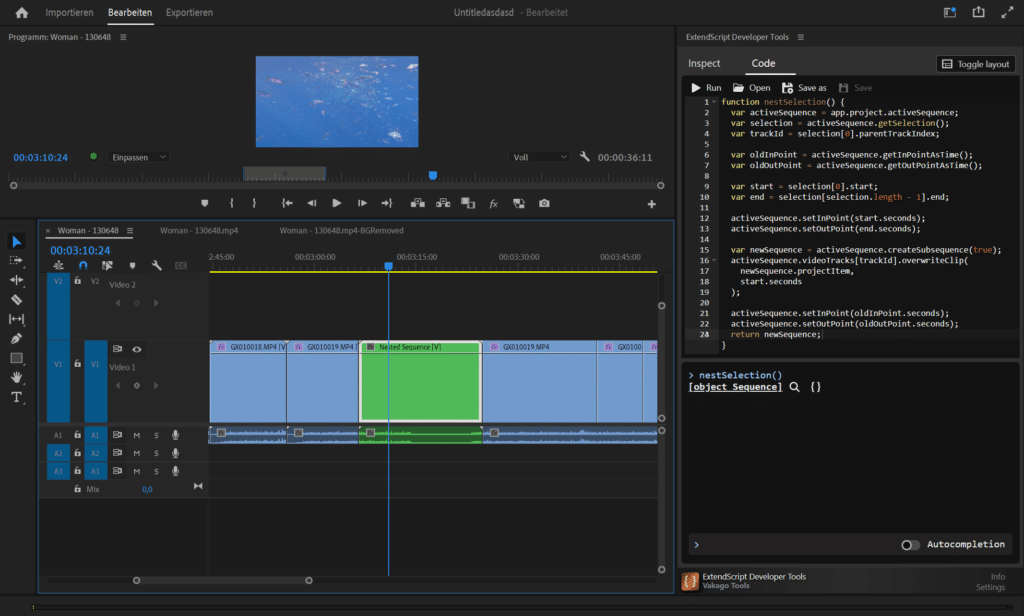
最初に app.project.activeSequence を使ってアクティブなシーケンスを取得します。次に getSelection() メソッドで現在の選択を取得します。選択中の最初のクリップのトラック番号を調べ、新しいネストシーケンスを挿入するトラックを決めます。
サブシーケンスを作成するときにイン/アウトポイントを変更する必要があるため、後で復元できるように、アクティブなシーケンスの現在のインポイントとアウトポイントを保存します。次のステップでは、選択範囲の開始時刻と終了時刻を取得します。これは、アクティブなシーケンスの inPoint と outPoint を設定するために使用されます。
次にcreateSubsequence()メソッドで新しいサブシーケンスを作成し、選択していたクリップを作成したシーケンスで上書きします。
function nestSelection() {
  var activeSequence = app.project.activeSequence;
  // Get the current selection in the active sequence
  var selection = activeSequence.getSelection();

  if (selection.length < 1) {
    return;
  }

  // We'll put the the sequence on the same track as the first item in the selection. The "cleaner" solution would be checking whether all clips are on the same track.
  var trackId = selection[0].parentTrackIndex;

  // In order to restore the previous in / out point we'll store the current values
  var oldInPoint = activeSequence.getInPointAsTime();
  var oldOutPoint = activeSequence.getOutPointAsTime();

  // Get the start and end times of the selection
  var start = selection[0].start;
  var end = selection[selection.length - 1].end;

  // Set the inPoint and outPoint of the active sequence to the start and end of the selection
  activeSequence.setInPoint(start.seconds);
  activeSequence.setOutPoint(end.seconds);

  // Create a new subsequence from the active sequence
  var newSequence = activeSequence.createSubsequence(true);

  // Overwrite the first video track of the active sequence with the new subsequence
  activeSequence.videoTracks[trackId].overwriteClip(
    newSequence.projectItem,
    start.seconds
  );

  // Restore the original inPoint and outPoint of the active sequence
  activeSequence.setInPoint(oldInPoint.seconds);
  activeSequence.setOutPoint(oldOutPoint.seconds);

  // Return newly created sequence
  return newSequence;
}

nestSelection();
ExtendScript Developer Tools
この記事ではAdobe Creative Cloud向けのExtendScript Developer Toolsを使います。詳しくは以下のボタンをご覧ください。